 SECURE SITE: Our SSL is 2048 SECURE SITE: Our SSL is 2048 |
 |
 |
||||||||||||||||||
| My Account | Shopping Cart (0) | ||||||||||||||||||||
 |
||||||||||||||||||||
|
||||||||||||||||||||
|
||||||||||||||||||||
|
||||||||||||||||||||


 |
|
|
|
| » Buy a PIN and Use it for PC-to-Phone, Web Call-Back and SMS Call-Back. IP 3-in-1 from PrepaidOnline.com! | |
|
|
Select a Service Below for Detailed InstructionsWeb Call-Back InstructionsSTEP 1: On the 'Web Trigger Page' - enter your Batch # followed by your PIN # (no spaces)STEP 2: Enter the phone number you are at in the origination field STEP 3: Enter the phone number you want to call in the destination field STEP 4: Then, simply click "Call Now" button to connect the two telephone #'s. SMS Callback InstructionsSend all SMS Requests to either +447797803066 + 447781484001
or +27831421494 (Depending on your location) We highly suggest you add this
number to your cell phone contact list for easier use.
Create a text message with the following information: CALL [phone_number] [batch ID+pin] where [phone_number] is the number to dial and [pin] is your pin number. US phone calls must be prefixed with a 1. Don't put brackets in the message. For example, to call (512) 555-0001 with a BATCH ID 11111 and PIN 9991234567890 you would enter: CALL 15125550001 111119991234567890 Once you have sent your message, within a few of seconds your phone will ring, and the second party will be connected. 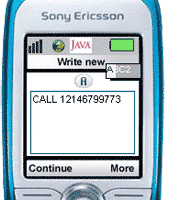 To make a call from your mobile phone, you only need to send an SMS with the
word “Call” and the phone number you are trying to reach To make a call from your mobile phone, you only need to send an SMS with the
word “Call” and the phone number you are trying to reach
Example SMS: CALL [telephone number] A few seconds after your SMS is sent, your phone will ring and you will be connected to the indicated number! Please note that you must always send the telephone number in international format with no spaces. 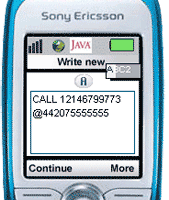 As it is less expensive to create a connection to a landline, SMS
passes those savings on to you in the form of lower per minute charges. As it is less expensive to create a connection to a landline, SMS
passes those savings on to you in the form of lower per minute charges.Normally you pay expensive fees to receive calls to your mobile while abroad; by instructing PrepaidOnline.com to make its initial call back to a landline close to you (i.e. a hotel, or office) these roaming charges are avoided! Example SMS: CALL [telephone number]@[your alternate number] click here. 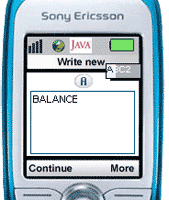 You can check your PIN balance at any time.
Just send an SMS with the following text: You can check your PIN balance at any time.
Just send an SMS with the following text:
Example SMS: BALANCE
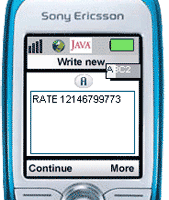 SMS Mobile allows you to check calling rates to anywhere in the world.
Simply send an SMS to the following text: SMS Mobile allows you to check calling rates to anywhere in the world.
Simply send an SMS to the following text:Example SMS: RATE [telephone number] Or, if you want to check the rate from your alternate number: Example SMS: RATE [telephone number]@[your alternate number] 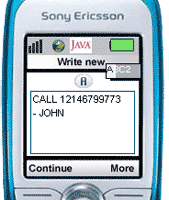 To make it even easier and faster, we have built in an address
book function that allows you to save a telephone number with a name. To make it even easier and faster, we have built in an address
book function that allows you to save a telephone number with a name.When you use SMS to call a number, you only need to add a “-” and a name after the number (please make sure that the name is one word with no spaces). The next time you call, you only need to use the name! Saving the number: Example SMS: CALL [telephone number] - [name] Using the saved name: Example SMS: CALL JOHN |
 |
 |
 |
 |
|
 |
 |
 |
|||||||||
|
|
|
|
Become
a PrepaidOnline.com Affiliate Become an Affiliate - Earn up to 20% on each referred sale. Business, fundraising, and other affinity opportunities. More |
|||||
|
|||||||||
| Home | Mobile Products | Specials | My Account | Wholesale | Affiliates | CC Auth. Form | |||||||||
| Copyright © 2001-2025 PrepaidOnline.com. All rights reserved. All prices are subject to change as per our Terms & Conditions. | |||||||||
 |
|||||||||
